
Shrine: Full Page Widget Maker for Fandoms
One full page widget for the thing you love most.
Shrine is a full page widget maker for fandoms. Build a home screen widget from your own photos, a live countdown and big stats, then let it fill the entire extra large widget on iOS 27: one whole page for your obsession instead of a small square in the corner.
A home screen widget that takes the whole page
Add the Shrine widget at the extra large widget size and your page is there every time you unlock your phone: not a corner of it, not a scatter of small widgets. Edit the shrine and the home screen widget updates the moment you save. On iOS 18 through 26 and on iPad the same shrine is a Large widget.
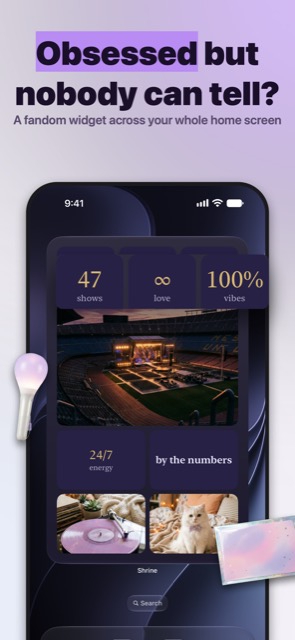
Photo widget, countdown widget, kpop widget, all on one page
A photo widget for the faces you want to see every time you unlock. A countdown widget to the concert, the finale or the comeback, ticking on its own. Stats that say 365 days, 100% vibes or whatever number matters to you. Every tile lives on the same page, so your kpop widget, your anime page or your best friend page reads as one shrine.
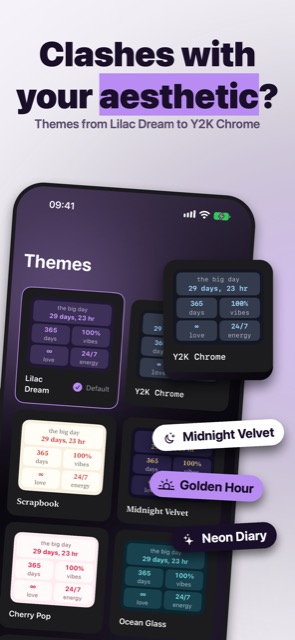
Aesthetic widget themes for every mood
From the soft indigo of Lilac Dream to the pale chrome of Y2K Chrome, pick a theme and the whole page restyles: a kpop theme for the comeback, a softer widget theme for your best friend page, an aesthetic widget that finally matches the rest of your home screen. Export the page as a hi-res image and set it as a lock screen wallpaper so your lock screen and your shrine belong together.
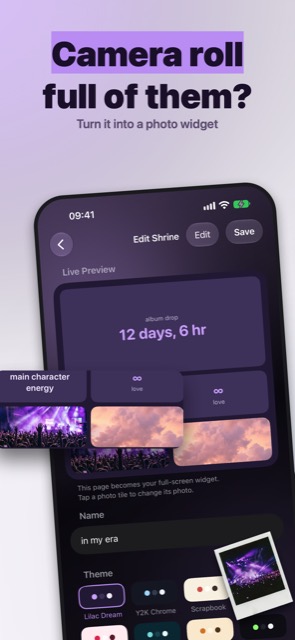
Build the custom widget you would have drawn yourself
Pick a layout such as Grid Shrine, Full Bleed, Countdown Focus, About Me or Stats Board. Add photo tiles from your camera roll, write a line or two, set a date, drop in a stat with a big number. Reorder tiles until it feels right; the live preview shows exactly what your page will look like. This widget maker is built for minutes, not evenings.
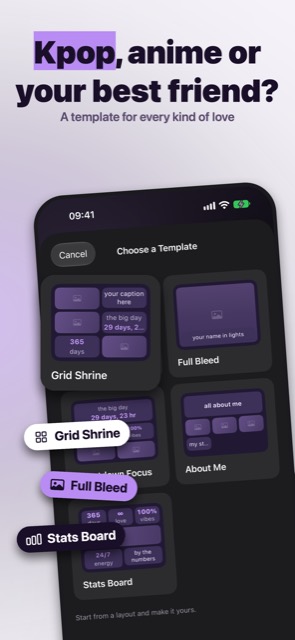
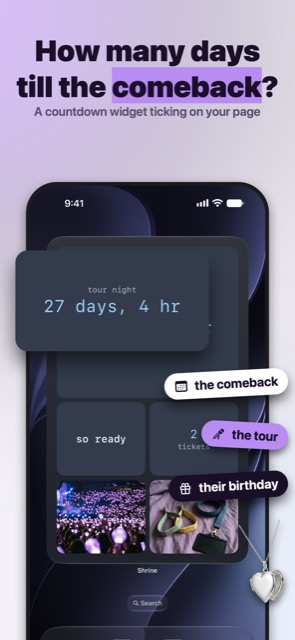
Count down to the comeback
Set the date once and the countdown ticks on its own, on the page you see most. Keep more than one shrine; the one you edited last is the one on your page, so the countdown can change with the season.
A fandom app that stays yours
Shrine is a fandom app for your home screen, not a feed. Your photos stay on your device and nothing you add to a shrine is uploaded anywhere. Aesthetic, fandom, home screen: this is the iOS 27 widget built for those three words.
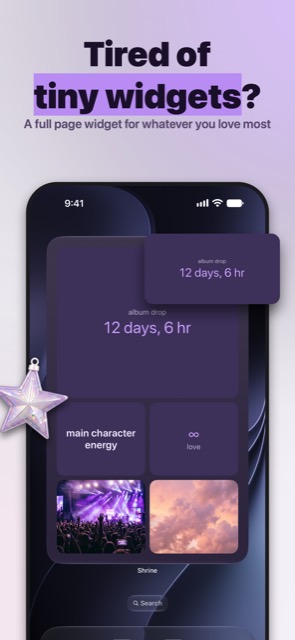
A small square widget is not enough for the thing you love.
A full page home screen widget from your own photos, a live countdown and big stats, for the extra large widget in iOS 27.
What Shrine changes about your home screen.
One whole page of your home screen belongs to the thing you love.
The countdown is the first thing you see, every time you unlock.
Your photos, your stats, your obsession, at full size.
Every unlock is a small reminder of the day you are waiting for.
Your home screen finally looks like it belongs to you.
Give the thing you love a whole page of your home screen.
For the thing you would put on a whole wall.
What Shrine does
A full page widget maker for fandoms: your photos, a countdown and stats filling a whole iOS 27 home screen page.
Shrine is the full page widget maker for fans: a kpop widget, a concert countdown or a birthday countdown, built from your own photos and filling the whole extra large iOS 27 widget. One cute home screen page for the thing you love most, instead of a small square in the corner. It is a widget maker for iPhone built for a whole page rather than a corner, because the extra large iOS widget is the first canvas big enough to hold the thing you actually care about.
Build a full page widget in minutes
Pick a layout template such as Grid Shrine, Full Bleed, Countdown Focus, About Me or Stats Board, and use the page like a moodboard. Add photo tiles from your camera roll, write a line or two so the page works as a text widget, set a date to count down to, drop in a stat with a big number. Reorder tiles until it feels right, and the live preview shows exactly what your page will look like. Make widgets you would have drawn yourself.
Photo widget, countdown widget, all on one page
A photo widget for the faces you want to see every time you unlock your phone. A countdown widget to the concert, the finale or the comeback, ticking on its own: the concert countdown and the birthday countdown live on the same page as the photos. Stats that say 365 days, 12 concerts or whatever number matters to you. Every tile lives on the same page, so your kpop widget, your anime widget or your best friend page reads as one shrine instead of a scatter of small widgets.
Cute widgets, y2k widgets and aesthetic themes
Themes give every shrine its own look, from the soft indigo of Lilac Dream to the pale chrome of Y2K Chrome and the warm pink of Cherry Pop: cute widgets and kawaii widgets for the bff page, y2k widgets for the throwback era, pink widgets for the soft era. Pick one and the whole page restyles, whether that is a kpop theme for the comeback or a softer widget theme for your best friend page, so your aesthetic widget matches the rest of your home screen. Shrine is a wallpaper maker too: export the page as a hi-res image and set it as your lock screen wallpaper, so your lock screen and your shrine page belong together.
DIY widgets, right on your home screen
Add the Shrine widget at the extra large widget size and your page is there every time you unlock your phone: diy widgets, no design degree needed. Edit the shrine and the home screen widget updates the moment you save. Keep more than one shrine; the one you edited last is the one on your page.
A fandom app that stays yours
Shrine is a fandom app that keeps your photos on your device; nothing you add to a shrine is uploaded anywhere, and there is nothing to sign up for. Aesthetic, fandom, home screen: this is the iOS 27 widget built for those three words.
Full page widgets need iOS 27 on iPhone. On iOS 18 through 26, and on iPad, Shrine gives you the same tiles, templates and themes as a Large widget.
Shrine is free to download. Prices, and what each plan includes, are shown in the app before any purchase.
Straight answers.
Which devices show the full page widget?
Full page widgets need iOS 27 on iPhone. On iOS 18 through 26, and on iPad, Shrine gives you the same tiles, templates and themes as a Large widget.
Is Shrine only for kpop?
No. A kpop widget is one shrine; an anime page, a best friend page, an About Me page or a countdown to your own big day are others. Anything you love fits.
Can I keep more than one shrine?
Yes. The one you edited last is the one on your page, and switching takes one edit.
Do my photos get uploaded?
No. Your photos stay on your device and nothing you add to a shrine leaves it.
Can I use my shrine as a wallpaper?
Yes. Export the page as a hi-res image and set it as a lock screen wallpaper so both screens match.
How do I put the full page widget on my home screen?
Build a shrine, then touch and hold an empty spot on your home screen until the apps jiggle, tap the plus and search for Shrine. Swipe to the full page size and add it, and your page is there every time you unlock.
One page for the thing you love.
Build it tonight and unlock to it tomorrow.
 SnoreScout
 TrackBuds
 Heirloom
 Vowlock
 Heighten
 ThreeOne
 Auguria
 Nelumi