
TrackBuds: Earbud Finder and Bluetooth Scanner App
Find lost earbuds by the signal, not by feel.
TrackBuds is an earbud finder app and BLE scanner for iPhone. It lists the Bluetooth devices around you that identify themselves, then shows a live signal meter that climbs as you get closer, so the search ends in minutes instead of an evening on your knees.
5.0 from 5 ratings on the App Store Turkey
A Bluetooth scanner app with a radar view
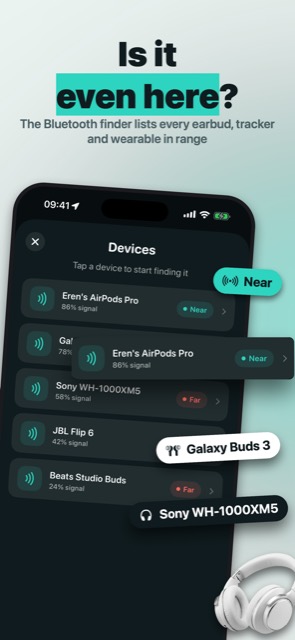
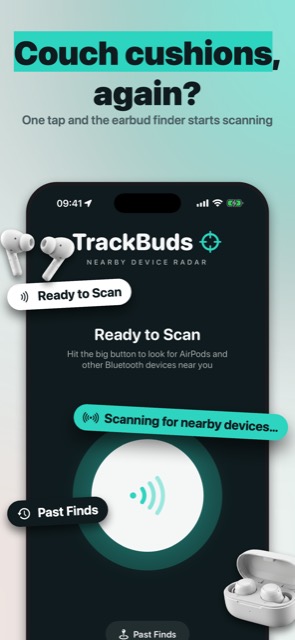
Start a scan and TrackBuds lists the devices around you that are switched on, in range and identify themselves, sorted by signal strength, with no pairing needed. It is the easy way to find Bluetooth devices at a glance and pick the one you are missing.
Under the hood it is a BLE scanner: it reads the Bluetooth Low Energy advertisements that headphones and speakers send out while they are on, and the Bluetooth scanner lists the devices that identify themselves, by the name they broadcast or, for AirPods and Beats, by model. Nameless Bluetooth traffic is left out.
A headphone tracker that follows the signal
Pick a device and walk. The meter climbs as you get closer and drops as you walk away, so you stop retracing your steps and start closing in. It works as a Bluetooth tracker for anything that broadcasts its name, not only earbuds.

Earbuds, headphones, the speaker in the other room: found by the signal
Find my earbuds, find my headphones, find the speaker: earbud finder, headphone finder, earphone finder, whatever you call it, if it is switched on, in range and identifies itself, TrackBuds can list it. Use it as a wireless earbuds finder for true wireless pairs, Galaxy Buds or Beats, to find lost headphones and headsets, or as a Bluetooth device finder for the portable speaker that walked off.
A device locator that remembers where things turn up
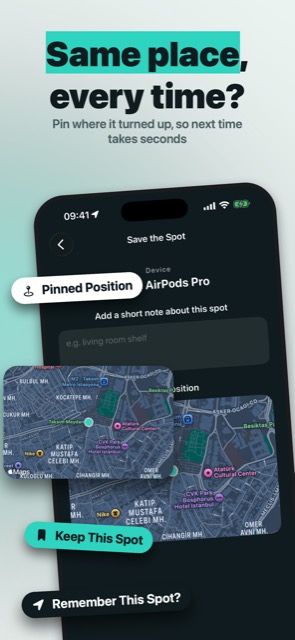
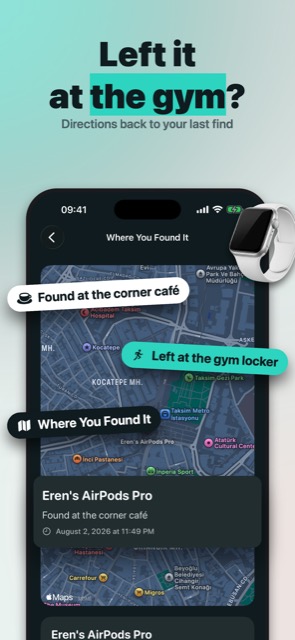
Found it? Save the spot on the map. The next time the same pair goes missing, your saved places show where it tends to hide, so you start the search where it ended last time.
Earbuds in a closed case: one rule, said plainly
If you came looking for an AirPods finder, one rule matters: AirPods and Beats only broadcast while they are out of the charging case and switched on. A closed or empty case is silent, so TrackBuds can only look for lost AirPods in that state, the same as any other device.
It cannot find AirTags or devices that hide behind rotating Find My identifiers, and it does not make anything play a sound; it guides you by signal strength alone. You deserve to know that before you spend an hour searching.
An earbud slipped down the sofa and the case is half empty.
A Bluetooth radar whose signal climbs as you get closer, so you search by the reading instead of by feel.
TrackBuds reviews
As someone who is always losing things, I could not be happier. Thanks to this app I find them straight away.
Better than the iPhone's own app. Very useful and I am really pleased with it. Well done to whoever made it, 5/5.
A great app, it works perfectly.
What TrackBuds changes about the search.
The bud is not lost, it is just quiet. The meter tells you which way to walk.
Ten minutes on your knees becomes one lap of the room.
It remembers the corner cafe where the last one turned up.
You stop pulling cushions off the sofa and start following a number.
The speaker you gave up on last week turns up on the list once it is switched on.
The next time a bud goes missing, you will know which way to walk.
Lost earbuds are a five-minute problem now.
Range
A device must be powered on, emitting a Bluetooth signal and within range, about 10 meters indoors. Inside that circle the meter tells you warmer or colder.
Permissions that make sense
Bluetooth to scan for devices and location only to save where you found them. The one other question is Apple's tracking prompt for ad measurement, and declining it changes nothing.
Your found spots stay with you
Saved places live on your iPhone. The next search starts from the place the last one ended.
For the search you are tired of doing on your knees.
What TrackBuds does
An earbud finder app and Bluetooth scanner: pick the device you lost and follow a signal that climbs as you get closer.
TrackBuds is an earbud finder app that helps you find lost earbuds, headphones and other Bluetooth devices by turning your iPhone into a Bluetooth radar. Scan, pick the device you are missing, and walk toward the signal until it turns up.
Need to find earbuds that fell between the couch cushions? Left your headphones somewhere in the house? Instead of retracing your steps, let TrackBuds show you how close you are. It listens for nearby Bluetooth devices and shows a live signal-strength meter that climbs as you get closer, so the search ends in minutes instead of hours. That is the whole point of a find lost earbuds app: fewer minutes on your knees under the sofa, more evening left over. It is a Bluetooth scanner app for iPhone too, so the speaker you misplaced last week shows up on the same list once it is switched on.
Earbuds and headphones, found by the signal
- Scan: TrackBuds lists the Bluetooth devices around you that are powered on, in range and identify themselves, no pairing required.
- Track: pick a device and follow the proximity indicator; the number climbs as you get closer.
- Found it: save the spot on the map so you know where your devices tend to turn up.
A Bluetooth scanner app with a radar view
Under the hood TrackBuds is a BLE scanner. It reads the Bluetooth Low Energy advertisements that headphones, speakers and other gadgets broadcast while they are switched on, and lists the devices that identify themselves (by the name they broadcast, or for AirPods and Beats by model), sorted by signal strength. Nameless Bluetooth traffic is left out, which makes it an easy way to find Bluetooth devices around you at a glance and choose the one you are looking for.
Lost headphones, speakers and more
Need to find lost headphones, Galaxy Buds or Beats rather than AirPods? The method is the same: switch the device on, start a scan, and follow the meter. TrackBuds works as a headphone finder and earphone finder for over-ear headphones and headsets, as a wireless earbuds finder for true wireless pairs, and as a general Bluetooth device finder for portable speakers and other gadgets that identify themselves over Bluetooth. Think of it as a headphone tracker and Bluetooth tracker in one place, plus a device locator that remembers where things were found.
What TrackBuds can and cannot find
If you are searching for an AirPods finder, one rule matters: AirPods and Beats only broadcast while they are out of the charging case and switched on, and a closed or empty case does not broadcast at all. TrackBuds can only look for them in that state, the same as any other device. It cannot find AirTags or other devices that hide behind rotating Find My identifiers, and it does not make a device play a sound; it guides you by signal strength alone.
Remember where things turn up
Every time you find a device you can save the spot on a map. The next time the same pair goes missing, check your saved locations first and start the search from the place it was found last.
TrackBuds needs Bluetooth to scan for devices and uses your location only to save where you found them. A device must be powered on, emitting a Bluetooth signal, and within range (about 10 meters indoors) to be detectable.
Scanning for devices and live tracking are part of the TrackBuds subscription. The price and terms are shown in the app before any purchase.
Straight answers.
Can TrackBuds find earbuds inside a closed case?
No. AirPods and Beats do not broadcast while they sit in a closed case. Once an earbud is out and switched on it broadcasts like any other device, and the AirPods finder works the same way as for other earbuds.
Does it work with item trackers or tags?
No. TrackBuds does not read Find My identifiers or AirTags. It lists ordinary Bluetooth devices that broadcast their names and guides you by signal strength.
How far away can it hear a device?
About 10 meters indoors. The device must be powered on, emitting a Bluetooth signal and within range.
Do I have to pair the device first?
No. The Bluetooth scanner reads the advertisements devices send while they are on, so a device that broadcasts its name nearby shows up without pairing.
Why does it ask for location?
Only to save the spot where you found a device. Scanning itself uses Bluetooth and nothing else.
Can it make my earbuds play a sound?
No. TrackBuds is a finder that follows signal strength; it cannot ring a device.
Stop searching by feel.
Scan, pick the device, walk toward the signal.
 SnoreScout
 Heirloom
 Vowlock
 Shrine
 Heighten
 ThreeOne
 Auguria
 Nelumi
